
With this instalment of our educational series we begin exploring the OA Compliance tab in the CORE Dashboard. Over the next three instalments we will look at the different compliance views the Dashboard offers: REF2029, the RIOXX metadata validator, and the Desirable Characteristics Report. We start with REF2029.
Highlights
What the REF2029 tab does
The REF2029 tab provides dedicated tools for monitoring how your repository is performing against REF2029 open access requirements. At present, we track the duration between a paper’s deposit and its official publication. CORE compiles this information from repository metadata, as detailed in the CORE recommendations for REF.
The four compliance widgets
At the top of the tab, four widgets display data related to REF2029 compliance and checking results:
- Total outputs. The number of outputs within this REF period (from 1 January 2021) for which CORE has data and can calculate compliance. This number is used to create the compliance percentage of a repository.
- Compliant. The number of outputs that have been deposited inside the 92-day window. The compliance rate is an estimation of actual compliance from the point of view of CORE data. UKRI will not use the rate calculated here; it will coordinate with institutions to check for exceptions and additional issues.
- Non-compliant. The number of outputs deposited outside the 92-day window. This is calculated from the deposit date that CORE collects from the metadata record and from the publication date, which combines other repository data with Crossref.
- Cross-repository check. Non-compliant outputs in your repository for which compliance is nevertheless met, because the paper was deposited in time in another repository.

Three charts for a closer look
Below the widgets, you will find three charts:
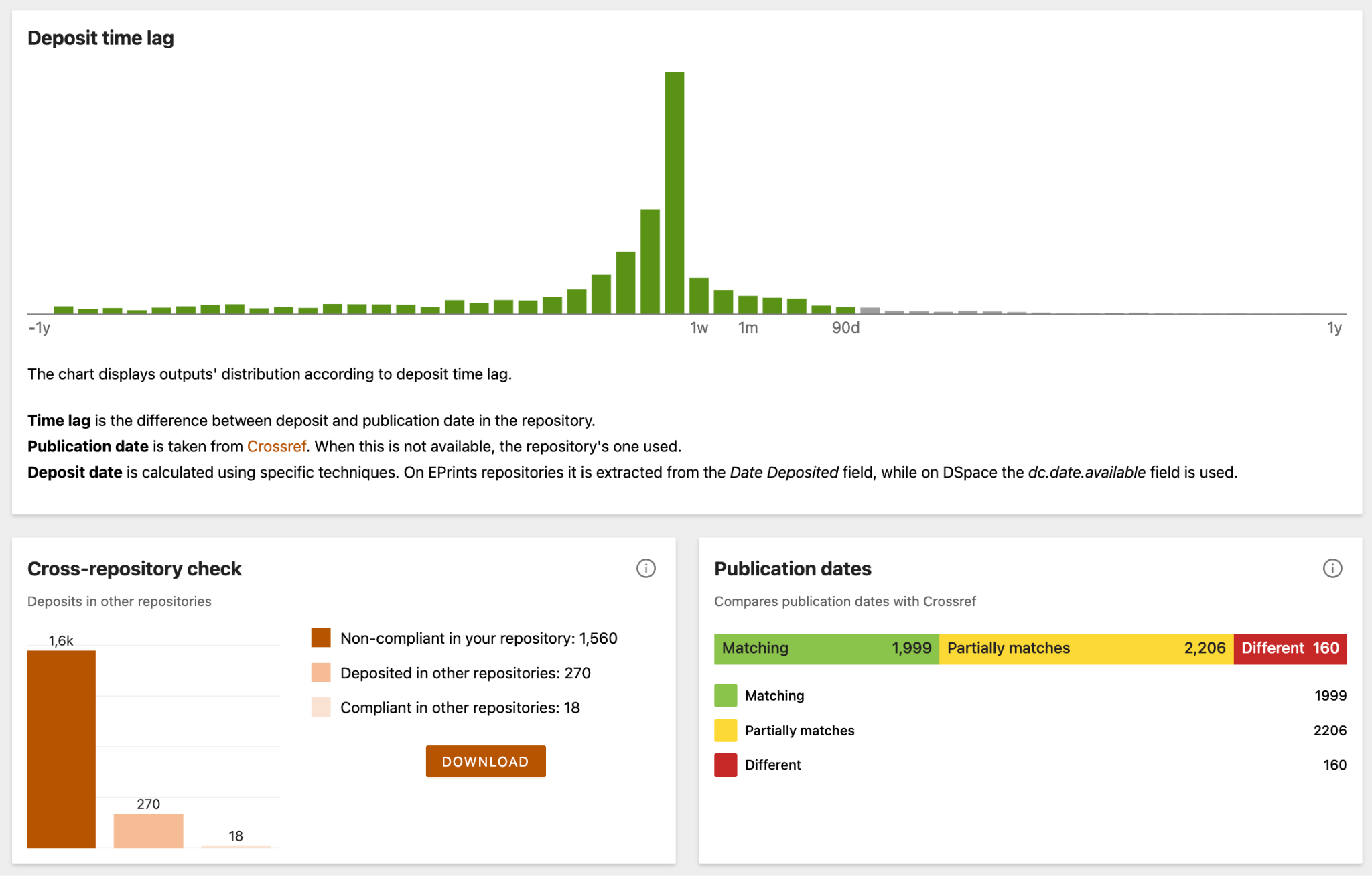
- Deposit time lag. This chart shows how your outputs are distributed by deposit time lag — the difference between the deposit date and the publication date in the repository.
- Cross-repository check. Here you can find statistics on deposits in other repositories compared with your non-compliant papers. You can download these papers as a CSV file to see more detail.
- Publication dates. We compare the publication dates in your repository records with the corresponding publication dates from Crossref. Where there is a mismatch, we mark it as “partial” if the dates are close to each other (within the same month), and “different” otherwise.
Below all the charts sits a list of papers from the selected timeframe, so you can move from the summary numbers to the individual outputs behind them.
We are committed to evolving our compliance features to reflect shifting OA landscapes. Development is currently underway to introduce monitoring tools for UKRI and Plan S policies. Should your institution require tracking for a specific policy not yet included, we encourage you to contact us to discuss potential support. We are always looking for ways to expand our reporting capabilities to better serve your needs.
CORE Dashboard Education Series: REF2029 Q&A Session
Join our online Q&A session on Wednesday 29 July at 11:00 am BST to get your questions answered and discuss how your repository can use the REF2029 compliance view. The 30-minute session is run by our team on Microsoft Teams.
Use this link to join:
Microsoft Teams meeting
CORE Dashboard Education Series: REF2029 Q&A Session | Meeting-Join | Microsoft Teams
Microsoft Teams
If you cannot attend, we still welcome your feedback via the “Feedback” button in the dashboard.
Useful links
Video tutorial: Using CORE to check OA compliance
Previous educational series material:
Understanding the CORE Dashboard: Managing Repository Content with the Content Tab
Understanding your repository’s indexing status in COREUnderstanding the CORE Dashboard: A Closer Look at the Overview Tab